How to Use AI Agents to Automate Your Small Business Workflows (Without Code)
In 2026, small businesses are no longer competing only with local companies. They are competing with businesses that automate customer support, sales follow-ups, marketing, invoicing, and reporting using AI-powered systems.
The good news? You no longer need a developer or coding skills to automate repetitive business tasks.
With modern AI agents for small business automation, even a small team can save hours every week by using no-code platforms like Zapier, Make, and n8n.
In this guide, you’ll learn:
- What AI agents actually are
- Best no-code AI automation tools
- How to automate your first workflow in under 30 minutes
- Real business use cases
- Common mistakes to avoid
- Pricing and free plan comparisons
What Are AI Agents (And Why Small Businesses Need Them Now)
AI agents are software systems that can perform tasks automatically using artificial intelligence and predefined workflows.
Unlike traditional automation tools that simply move data from one app to another, AI agents can:
- Understand customer messages
- Generate responses
- Summarize information
- Analyze documents
- Make decisions based on conditions
- Trigger multiple business actions automatically
For example:
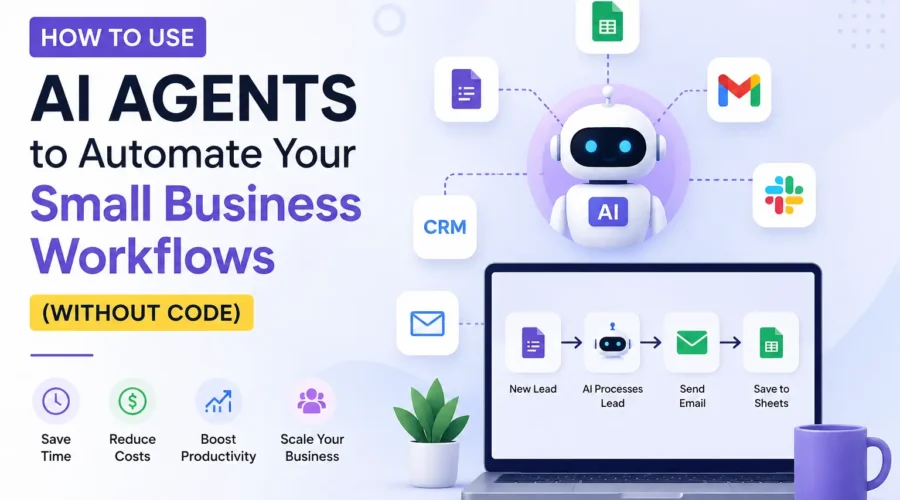
- A customer submits a website form
- The AI agent analyzes the request
- Creates a lead in CRM
- Sends a personalized email
- Notifies your sales team on Slack
- Schedules a follow-up reminder
All of this can happen automatically without manual work.
Why Small Businesses Are Adopting AI Automation Fast
Small businesses usually face:
- Limited staff
- Repetitive tasks
- Slow customer response times
- High operational costs
AI agents solve these problems by handling routine work 24/7.
Benefits include:
- Faster customer support
- Better lead management
- Reduced human errors
- Lower operational costs
- Improved productivity
- More time for growth-focused work
Businesses using AI automation often save 10–20 hours weekly on repetitive tasks alone.
Top No-Code AI Automation Tools Compared
Here are the most popular no-code AI automation platforms for small businesses in 2026.
| Tool | Best For | Difficulty | Free Plan | Key Advantage |
|---|---|---|---|---|
| Zapier | Beginners | Easy | Yes | Massive app integrations |
| Make | Visual workflows | Medium | Yes | Advanced automation logic |
| n8n | Developers & advanced users | Medium | Yes | Self-hosted flexibility |
| Airtable | Database workflows | Easy | Yes | Spreadsheet + automation |
| Notion AI | Content & knowledge management | Easy | Limited | AI writing assistance |
1. Zapier
Zapier is one of the easiest automation tools for beginners.
It supports thousands of apps including:
- Gmail
- Slack
- Shopify
- Google Sheets
- HubSpot
- WordPress
Best for:
- Simple workflows
- Email automation
- CRM updates
- Lead notifications
2. Make
Make offers powerful visual automation builders.
Best for:
- Multi-step workflows
- Complex business logic
- E-commerce automation
- Data processing
3. n8n
n8n is growing rapidly because of its flexibility and self-hosting capabilities.
Best for:
- Advanced AI workflows
- Privacy-focused businesses
- Custom integrations
- Technical users
Step-by-Step: Automate Your First Workflow in 30 Minutes
Let’s build a simple AI-powered workflow using no-code tools.
Goal:
Automatically respond to new website leads.
Workflow:
- Customer submits contact form
- AI generates personalized reply
- Email sent automatically
- Lead saved in Google Sheets or CRM
Tools Needed
Step 1: Connect Your Form
Connect your:
- WordPress form
- Typeform
- Google Forms
- Shopify inquiry form
The automation tool detects every new submission automatically.
Step 2: Add AI Processing
Use OpenAI integration to:
- Understand customer intent
- Write personalized replies
- Categorize lead priority
Example prompt:
“Generate a professional reply to a customer asking about pricing for web design services.”
Step 3: Send Automated Email
Connect Gmail and automatically send the AI-generated response.
This dramatically improves response speed.
Step 4: Save Data Automatically
Store all leads inside:
- Google Sheets
- Airtable
- HubSpot
- Notion
Now your team can track every inquiry easily.
Step 5: Add Team Notifications
Send alerts directly to:
- Slack
- Microsoft Teams
- Telegram
Your sales team gets notified instantly.
Real-World Use Cases by Industry
AI automation works for almost every small business industry.
E-Commerce Stores
Automate:
- Order confirmations
- Customer support replies
- Refund processing
- Product recommendations
- Review requests
Popular stack:
- Shopify + Zapier + OpenAI
Digital Marketing Agencies
Automate:
- Lead qualification
- Client onboarding
- Social media reporting
- SEO audits
- Content approvals
Real Estate Businesses
Automate:
- Property inquiry replies
- Appointment scheduling
- Lead nurturing
- CRM updates
Healthcare Clinics
Automate:
- Appointment reminders
- Patient intake forms
- FAQ responses
- Billing notifications
Freelancers & Consultants
Automate:
- Proposal generation
- Invoice reminders
- Client follow-ups
- Meeting summaries
Common Mistakes to Avoid
Many businesses fail with automation because they overcomplicate workflows.
Here are the most common mistakes.
1. Automating Broken Processes
AI cannot fix inefficient business systems.
First:
- Simplify workflows
- Remove unnecessary steps
- Standardize operations
Then automate.
2. Using Too Many Tools
Avoid creating complicated systems with 10+ platforms.
Start small:
- One automation platform
- One AI integration
- One business problem
3. Ignoring Human Review
AI-generated content should still be monitored.
Always review:
- Customer emails
- Financial actions
- Legal communication
- Sensitive responses
4. Poor Prompt Design
Weak prompts lead to poor AI output.
Good prompts should include:
- Tone
- Business context
- Desired outcome
- Customer type
5. No Error Monitoring
Automations can fail silently.
Always add:
- Error alerts
- Backup notifications
- Workflow logs
Pricing & Free Tier Breakdown
Here’s a quick pricing comparison for beginners.
Which Tool Should You Choose?
Choose:
- Zapier if you want simplicity
- Make if you want visual advanced workflows
- n8n if you want full control and lower long-term cost
Final Thoughts
AI automation is no longer just for large enterprises.
Today, even small businesses can use AI agents for small business automation to:
- Reduce repetitive work
- Improve customer experience
- Increase productivity
- Save money
- Scale faster
The best part is that you don’t need coding skills to start.
Platforms like Zapier, Make, and n8n make AI automation accessible for everyone.
Start with one simple workflow today. Once you see the time savings, you’ll quickly discover dozens of other processes that AI can automate for your business.
If implemented correctly, AI agents can become one of the highest ROI investments for modern small businesses.